
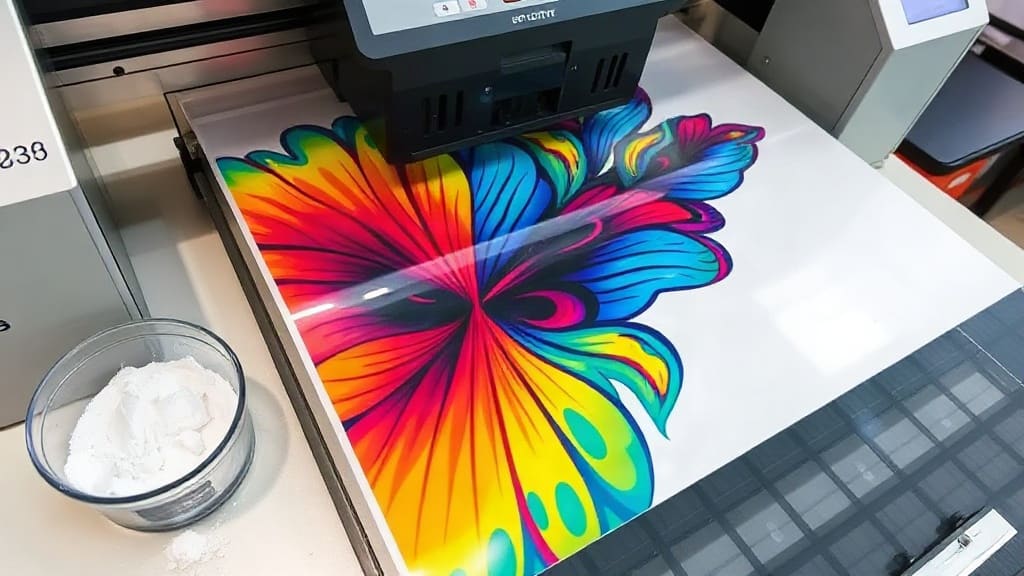
DTF transfers have taken the custom apparel industry by storm, offering a versatile and cost-effective way to create vibrant, durable prints on a wide range of fabrics. Whether you're a seasoned printer or a small business owner looking to expand your product line, understanding this technology is crucial. In this guide, we'll dive deep into what DTF transfers are, how they compare to other methods, and how you can achieve professional results every time.
What Are DTF Transfers?
DTF (Direct to Film) transfers are a printing method where a design is printed onto a special PET film using a DTF printer and pigment inks. The printed film is then coated with a hot-melt adhesive powder, which is cured, and finally, the transfer is applied to fabric using a heat press. This process allows for high-detail, full-color prints that are soft to the touch and highly durable.
Unlike traditional screen printing, DTF does not require screens or complex setup, making it ideal for short runs and on-demand production. It also works on a variety of fabrics, including cotton, polyester, blends, and even tricky materials like nylon and leather, which makes it a favorite among custom apparel businesses.
Why Choose DTF Transfers Over Other Methods?
The custom printing landscape offers several options: screen printing, vinyl, sublimation, and DTF. Each has its strengths, but DTF transfers stand out in several key areas.
- Versatility: DTF prints adhere to almost any fabric type, including dark and light colors, without the need for pretreatment. This flexibility is unmatched.
- Detail and Color: DTF printers can reproduce intricate details and a wide color gamut, including white ink for dark garments, ensuring your designs pop.
- Durability: The adhesive layer creates a strong bond that withstands repeated washing and stretching, making it ideal for everyday wear.
- Cost-Effective for Small Runs: Since there's no screen setup, you can print a single item or a hundred at a similar cost per piece, which is perfect for samples and custom orders.
When compared to sublimation, DTF works on cotton and doesn't require polyester fabrics or special coatings. And unlike vinyl, DTF allows for photorealistic images and gradients without the need for weeding.
How to Use DTF Transfers: A Step-by-Step Guide
Getting started with DTF transfers is straightforward, but success lies in the details. Here's a step-by-step process to ensure perfect results.
Step 1: Prepare Your Artwork
Create or edit your design in a graphic software. Ensure it has a resolution of at least 300 DPI. For dark garments, your design will need a white underbase. Most DTF printers handle this automatically, but you can also set it up in your RIP software.
Step 2: Print the Film
Load the PET film into your DTF printer with the correct side facing up. Print your design using DTF pigment inks. The order typically includes CMYK plus white, and sometimes light magenta and light cyan for smoother gradients.
Step 3: Apply the Adhesive Powder
While the ink is still wet, cover the printed design with hot-melt adhesive powder. The powder should be evenly spread over the entire printed area, including the white underbase. Shake off excess powder, ensuring no bare spots.
Step 4: Cure the Powder
Pass the printed film through a curing oven or use a heat press to melt the powder. The typical temperature is around 160°C (320°F) for 60-90 seconds. This melts the powder into a uniform adhesive layer that will bond with the fabric.
Step 5: Press the Transfer
Place the transfer on your garment with the printed side facing down. Use a heat press set to about 160-170°C (320-338°F) with medium pressure for 10-15 seconds. Make sure your garment is flat and the transfer is placed correctly.
Step 6: Peel the Film
After pressing, allow the transfer to cool for a few seconds, then peel the film away. You can do a hot peel or cold peel depending on the film type. Most DTF films are hot peel, meaning you peel immediately after pressing. Check your film's specifications.
For best results, perform a second press with a Teflon sheet to set the adhesive further and enhance washability.
Tips for Achieving High-Quality DTF Transfers
Like any printing process, DTF has its nuances. Here are some expert tips to help you avoid common pitfalls and produce professional prints.
Calibrate Your Printer Settings
Each DTF printer and ink set is different. Use a color profile and calibrate your printer regularly to ensure color accuracy. Print test images to check for banding, misalignment, or color shifts, and adjust settings accordingly.
Choose the Right Film and Powder
Not all PET films are created equal. High-quality films have a coating that holds ink well and releases cleanly. Similarly, the adhesive powder must be compatible with your film and have the right particle size. Test different brands to find what works best.
Maintain Optimal Temperature and Pressure
Heat press temperature and pressure are critical. Too low, and the adhesive won't activate; too high, and you might scorch the fabric or cause ghosting. Use a heat press with precise controls and always test on a scrap piece.
Handle Dark vs. Light Fabrics
For dark fabrics, the white underbase is essential for colors to pop. Ensure your printer is configured to lay down enough white ink. For light fabrics, you can print with just CMYK, which saves ink and produces a softer hand.
Post-Pressing and Curing
After peeling, a second press with a Teflon sheet (or parchment paper) at lower temperature for 5 seconds can improve durability and smooth out any texture. This step also helps the adhesive fully cure, making the print more wash-resistant.
Common Mistakes to Avoid with DTF Transfers
Even seasoned printers make errors. Here are some pitfalls to watch out for:
- Insufficient Powder: Not applying enough adhesive powder leads to poor adhesion and cracking. Always apply a generous, even coat.
- Wrong Peel Temperature: Peeling too hot or too cold can cause the transfer to stick or the film to leave residue. Follow the film's recommendations.
- Poor Film Storage: PET film is sensitive to humidity. Store it in a dry place and avoid touching the printable side.
- Ignoring Pretreatment: Some fabrics, especially those with water-repellent coatings, may need pretreatment. Test your garments first.
- Not Cleaning the Printhead: DTF printers require regular maintenance. Clogged printheads cause streaks and poor ink flow.
How DTF Transfers Boost Your Business
For entrepreneurs and small businesses, DTF transfers open up new revenue streams without a massive upfront investment. Here's how they can help you grow:
- Low Start-Up Costs: A DTF printer setup is more affordable than a screen printing station, making it accessible for startups.
- On-Demand Printing: You can produce custom items as orders come in, reducing inventory and waste.
- Diverse Product Range: From t-shirts to tote bags, caps, and even shoes, DTF allows you to offer a wide variety of products.
- Speed: Once your design is ready, a transfer can be printed and pressed in minutes, enabling quick turnaround times for customers.
Many businesses also use DTF to create transfers that are sold wholesale to other decorators. This creates an additional B2B revenue stream.
Frequently Asked Questions About DTF Transfers
How long do DTF transfers last?
With proper application and care, DTF transfers can last as long as the garment itself. They are designed to withstand 50+ washes without cracking or fading, provided you use quality materials and follow the pressing guidelines. Always recommend customers wash garments inside out in cold water and avoid ironing directly on the design.
Can DTF transfers be used on any fabric?
DTF transfers are highly versatile and work on a wide range of fabrics, including cotton, polyester, blends, and even materials like denim and canvas. However, fabrics with a very tight weave or those that are water-repellent may require a special pretreatment to ensure proper adhesion. Always test a small area first.
Do I need a special printer for DTF transfers?
Yes, you need a DTF printer, which is an inkjet printer modified to handle pigment inks and equipped with a white ink circulation system. Many standard eco-solvent printers can be converted, but it's recommended to use a dedicated DTF printer for best results and reliability.
What is the difference between DTF and DTG?
DTG (Direct to Garment) prints directly onto the fabric, while DTF uses a film that is transferred to the fabric. DTF is often preferred for its versatility across fabric types and its ability to handle both small and large orders without the need for pretreatment. DTG requires a pretreatment for cotton and only works on 100% cotton fabrics for best results.
Can I use DTF transfers for dark garments?
Absolutely. In fact, DTF is excellent for dark garments because it uses a white underbase that ensures vibrant colors. The white ink is printed as a base layer, and then the color layers are printed on top. This makes DTF a go-to choice for printing on black or navy shirts.
In summary, DTF transfers are a revolutionary technology that empowers creators and businesses to produce high-quality custom apparel with ease. By understanding the process, avoiding common mistakes, and implementing best practices, you can unlock endless possibilities for your brand or customers. Whether you're just starting or looking to upgrade your printing capabilities, DTF is a smart investment that delivers lasting results.