
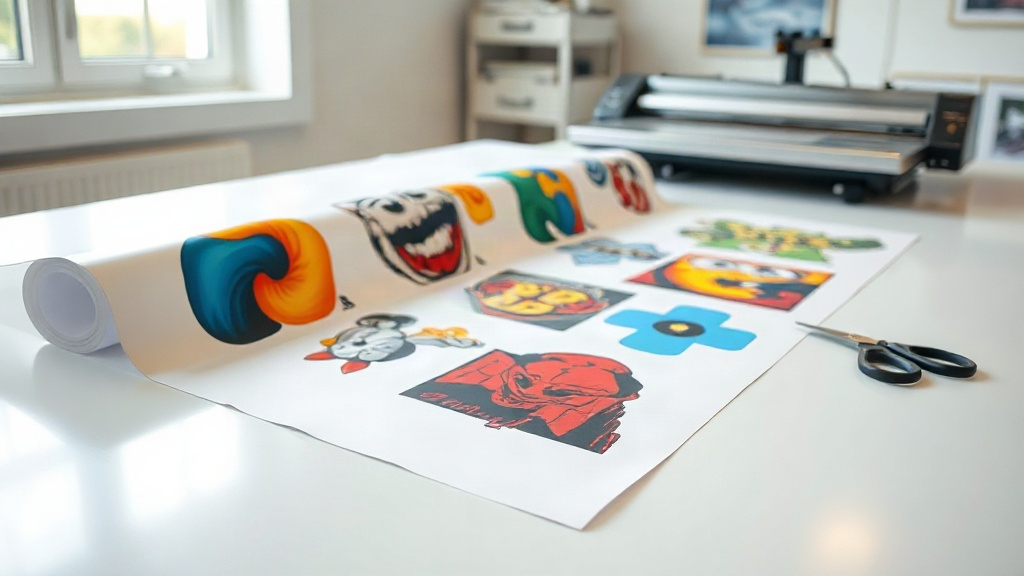
If you're in the custom apparel business, you've likely heard about DTF printing. It's a game-changer for producing vibrant, durable transfers on various fabrics. But did you know you can take your efficiency to the next level with DTF gangsheets? These large sheets allow you to print multiple designs in one go, saving time, money, and materials. In this guide, we'll dive deep into DTF gangsheets, covering what they are, how to create them, and why they should be part of your printing arsenal.
What Is a DTF Gangsheet?
A DTF gangsheet is a single sheet of DTF transfer film that contains multiple designs arranged together. Instead of printing one design at a time, you gang multiple images onto one sheet, hence the name. This approach maximizes the use of the film and ink, reducing waste and cost per print. It's similar to gang printing in traditional offset printing, where multiple jobs are combined on one sheet to save resources.
With DTF gangsheets, you can print a variety of sizes and quantities in one batch. Whether you need 50 small logos and 10 large back prints, you can fit them all on one sheet. This is especially useful for print shops that handle diverse orders daily.
Why Use DTF Gangsheets?
The benefits of DTF gangsheets go beyond just saving film. Here are key advantages:
- Cost Efficiency: By maximizing the use of each sheet, you reduce the amount of film and ink used per design. This lowers your cost per print, especially for small designs.
- Time Savings: Printing multiple designs at once means less setup time and faster production. You can complete large orders more quickly.
- Consistency: When you print multiple designs on one sheet, they go through the same process together, ensuring consistent quality and color across the board.
- Versatility: You can mix and match designs of different sizes and shapes on one sheet, accommodating various customer needs.
- Reduced Waste: Leftover film from small jobs is minimized, which is better for your bottom line and the environment.
How to Create a DTF Gangsheet
Creating a DTF gangsheet involves a few steps, from design preparation to printing. Here's a step-by-step guide:
1. Prepare Your Designs
Start by ensuring all your designs are in a compatible format, typically PNG with transparent backgrounds. Make sure they are sized correctly for their intended placement (e.g., full front, left chest). If you're using a RIP software, it will handle the layout, but you can also manually arrange designs in a graphics program like Photoshop or Illustrator.
2. Choose the Right Film Size
DTF gangsheets come in various sizes, commonly 13" x 19" or 22" x 24". Choose a sheet size that fits your printer and the total area of your designs. Larger sheets allow more designs but require a printer that can handle them.
3. Arrange Designs Efficiently
This is where the magic happens. Arrange your designs to minimize wasted space. Rotate and nest designs if possible. Leave a small gap (about 0.25 inches) between designs to avoid overlapping during cutting. If you're using RIP software, it can auto-nest for you. Otherwise, do it manually in your design software.
4. Print and Cure
Print your gangsheet using DTF printer and inks. After printing, apply hot melt adhesive powder evenly over the wet ink. Shake off excess powder, then cure the sheet in an oven or with a heat press. Follow your powder and ink manufacturer's recommendations for temperature and time.
5. Cut and Store
Once cured, you can cut out individual designs. If you used a RIP software, it might include cut lines. Otherwise, cut by hand or use a cutting machine. Store the transfers in a cool, dry place until ready to apply.
Tips for Maximizing Efficiency with DTF Gangsheets
To get the most out of your DTF gangsheets, consider these tips:
- Group Similar Jobs: If you have multiple orders with the same design, gang them together to save time.
- Use Nesting Software: Invest in RIP or nesting software that automatically arranges designs for optimal use of space.
- Standardize Sizes: If possible, standardize design sizes to make nesting easier and reduce waste.
- Keep a Library: Maintain a library of frequently used designs so you can quickly add them to gangsheets.
- Test Your Process: Before running a large gangsheet, test with a small one to ensure your settings are correct.
Common Mistakes to Avoid
Even experienced printers can make mistakes with DTF gangsheets. Here are pitfalls to watch out for:
- Overcrowding: Packing designs too tightly can cause ink bleeding or difficulty cutting. Leave adequate space.
- Inconsistent Powder Application: Uneven powder can lead to poor adhesion or rough texture. Apply evenly and shake off excess.
- Incorrect Curing: Under-curing results in washes out; over-curing can make transfers brittle. Follow guidelines.
- Ignoring Film Orientation: Some films have a printable side; printing on the wrong side ruins the sheet.
Frequently Asked Questions
What is the maximum size for a DTF gangsheet?
The maximum size depends on your printer. Common sizes are up to 13" x 19" for desktop printers and 24" x 36" or larger for industrial machines. Always check your printer's specifications.
Can I mix different designs on one gangsheet?
Absolutely. That's the primary benefit. You can combine any designs as long as they fit on the sheet and are properly spaced.
How do I price DTF gangsheet printing for customers?
Pricing can be based on the total area used or per design. Many printers charge by the linear inch of film used. Calculate your costs (film, ink, powder, labor) and add your profit margin.
Do I need special software to create a gangsheet?
While you can manually arrange designs in graphic software, RIP software designed for DTF printing automates the process, ensuring optimal layout and color management. It's a worthwhile investment for frequent gangsheet printing.
How should I store unused DTF gangsheets?
Store them in a cool, dry place away from direct sunlight. Keep them in a sealed bag or container to prevent dust and moisture from affecting the adhesive.
Mastering DTF gangsheets can significantly improve your printing operation's efficiency and profitability. By following the steps and tips outlined here, you'll be well on your way to producing high-quality transfers with minimal waste. Start experimenting with gangsheets today and see the difference in your workflow.